


In short: the Content studio is a pipeline from topic to schedule: topic → script (several options to choose from) → voiceover → visuals → captions → language versions → your review → the publishing schedule. AI only uses the real selling points in your asset library, and an automatic similarity check sends back any video that's too close to another.
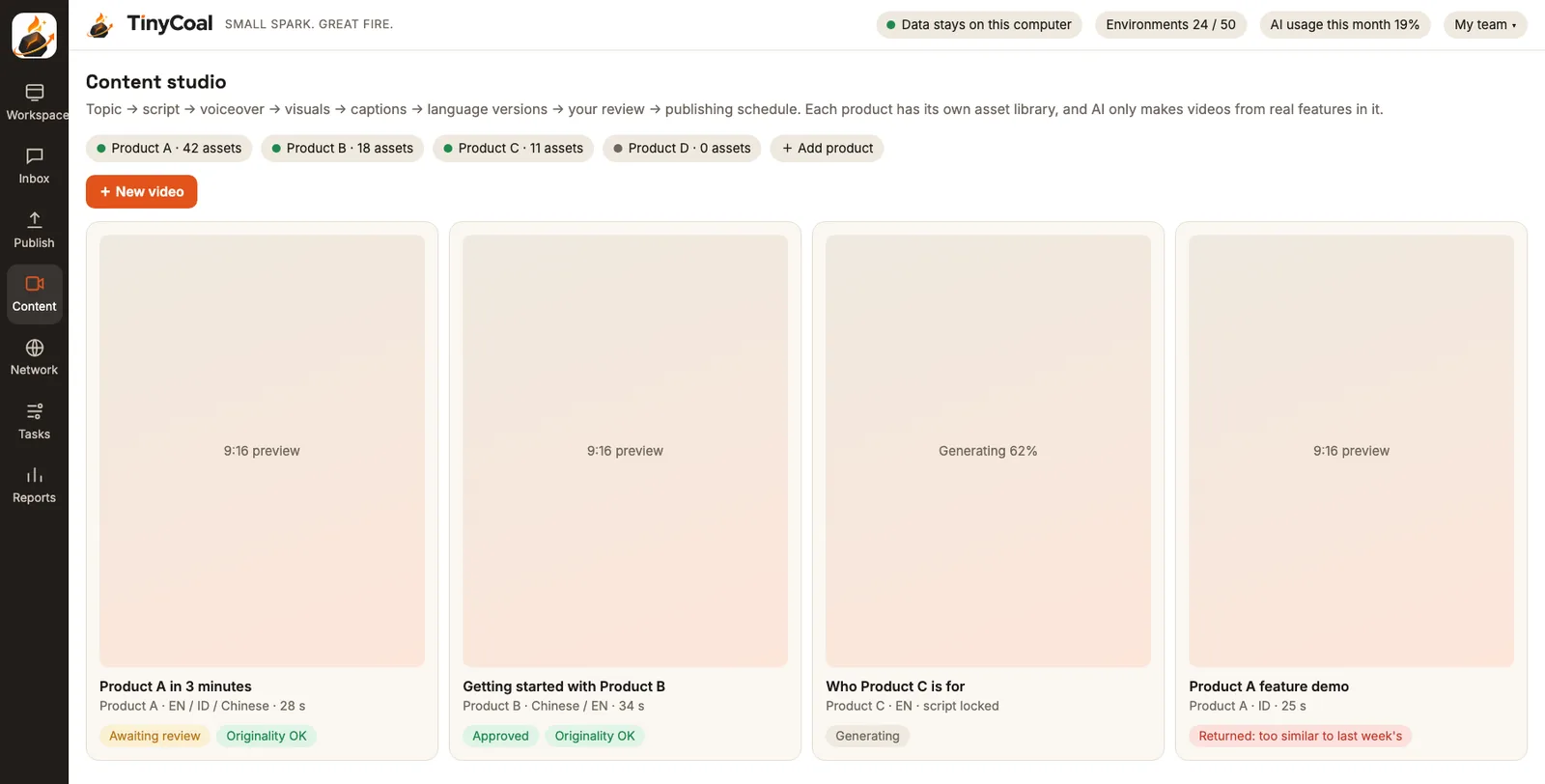
From topic to schedule in seven steps
| Step | What AI does | What you do |
|---|---|---|
| 1 Topic | Suggests several topics based on your asset library, past results and questions customers often ask in messages | Pick one, or write your own |
| 2 Script | Writes 3 scripts at once, each with a different opening and structure | Choose one and edit if needed |
| 3 Voiceover | Generates voiceover for the language and style | Change the voice or speed |
| 4 Visuals | Fits your assets (screen recordings, product photos, real footage) into templates, adding a few AI shots only when needed | Swap assets |
| 5 Captions | Syncs captions automatically | Fix typos |
| 6 Languages | Translates the script, re-records the voiceover and re-times the captions, not just a subtitle swap | Choose which languages you want |
| 7 Review | Shows the similarity result and where AI disclosure is needed | Approve or send back; approved videos go to the schedule |
You can stop and edit at any step, and review is never skipped automatically. Where and when approved videos are posted is set in the publishing schedule.
Asset library: AI only says what's true
Create an asset library for each product you promote: screen recordings, product photos, selling points, pricing, common questions and real use cases. When AI writes a script, it can only use information from the library, so features that aren't in it never show up in a video. That has two benefits: no exaggeration, and when customers ask about it later in messages, the answers match what the video said.
The library is also how you avoid repetitive videos: the more assets you have, and the more specific they are, the more versions AI can build. Software teams can read how software and brand teams use it; teams selling products can read how cross-border sellers use it.
Similarity check: videos that are too alike go back
TikTok's Community Guidelines state that unoriginal content and reused material are not eligible for the For You feed. Posting the same video on another account with only new captions is the most common waste of effort. Before review, the Content studio automatically compares:
- against videos this account has posted before
- against videos for the same product on other accounts
- the script, the first few seconds, the shot order, the cover and the voiceover
Videos above the similarity threshold are marked "Returned: too similar to another video", with suggested fixes such as a new opening, a different scene or a different angle. For why videos end up looking the same and how to prevent it at the source, read our full guide, Why AI videos look the same.
Labeling AI-generated content
TikTok requires labels on realistic content that is AI-generated or significantly edited; unlabeled content may be removed, have its reach limited, or get a label added by the platform. During review, the Content studio flags which videos use AI shots or AI voiceover, and at publishing time it reminds you to turn on the platform's AI label. Details in Do you need to label AI-generated content?
Making language versions sound natural
A language version isn't English subtitles on the original video. For each language, the Content studio rewrites the voiceover script (keeping the selling points, using local phrasing), records new voiceover, then re-times the visuals and captions to the new pace. The Indonesian and English versions may differ in length and rhythm, and that's normal.
Each language version is matched to the accounts for that country, and posting times follow local time. For setting an account's language and time zone, see Matching language and time zone across countries and Separate account environments.
Where videos are made
Videos are rendered on your own computer, so your assets don't need to be uploaded to our servers. Steps that need an AI model, such as scripts, translation and voiceover, follow the privacy mode you chose in Settings, and every call is logged on your computer. See Local data and privacy.
How the videos perform shows up in the next day's report, with views, engagement and inquiries by video, by account and by product.
Who on the team handles content
In a small team, one person usually picks topics and reviews, while AI produces. If you make content for several clients, give each client its own asset library and reviewer; see how agencies use it. Team roles are covered in How a team manages multiple TikTok accounts. Once videos are live, handling questions in many languages in comments and messages is covered in How to reply to messages in many languages; to see each morning which videos failed to post, use the daily checklist. Teams that only run TikTok business accounts can first compare with what the official Business Center offers to see which steps it already covers. All features are in the features overview, team setups are under Who it's for, and to try it early, join early access.
FAQ
Can AI make and post videos every day with no one involved?
Not by default. Every video needs your review, and publishing needs your confirmation by default. Auto-publish is a switch you turn on yourself, and even then we recommend keeping the review step.
Can I use footage I shot myself?
Yes, and we recommend it. Real footage and real screen recordings do the most to keep videos original. Only use material you have the right to use.
Does it support formats other than vertical?
By default it renders 9:16 vertical video, the standard for short-video platforms, and it can also produce 1:1 and 16:9 versions for other platforms.
How long does a video take to generate?
It depends on the video length and your computer's hardware. Generation runs in the background, so you can keep working on other things. More answers in the FAQ.