


The short answer: TinyCoal suits small agencies that run social media accounts for several clients at once. You group accounts by client and give each client its own product notes and reply rules, and AI drafts only from that client's material. Each account environment can only be open once at a time, so two colleagues never work the same account at the same moment. Weekly client reports can be put together straight from the checks and content data. One condition applies: every account must be legally held by the client, or the client must clearly authorize you to run it.
Here is an example: a five-person agency with a skincare brand (2 TikTok accounts each in the US and UK), a bubble tea chain (3 accounts across Singapore and Malaysia) and an outdoor gear brand (4 accounts).
Group by client first, then by country and platform
In TinyCoal every account is a separate environment that you can group by country, platform, product or client, with notes and tags. For agencies, we suggest putting the client at the top level:
| Group level | Example | What this level controls |
|---|---|---|
| Client | Skincare brand, bubble tea chain, outdoor gear | Product notes, reply rules, asset library, report scope |
| Country | US, UK, Singapore | Network exit location, interface language, time zone, posting slots |
| Platform | TikTok first, then Instagram, Facebook, YouTube | Each platform's posting and messaging rules |
| Notes | "The client's marketing manager approves videos", "Ask the client for the two-step code" | The details most likely to get lost in a handover |
Each environment can only be open once at a time. While the colleague on messages is working the bubble tea client's Singapore account, the colleague posting videos sees that the account is in use, so the same reply never goes out twice.
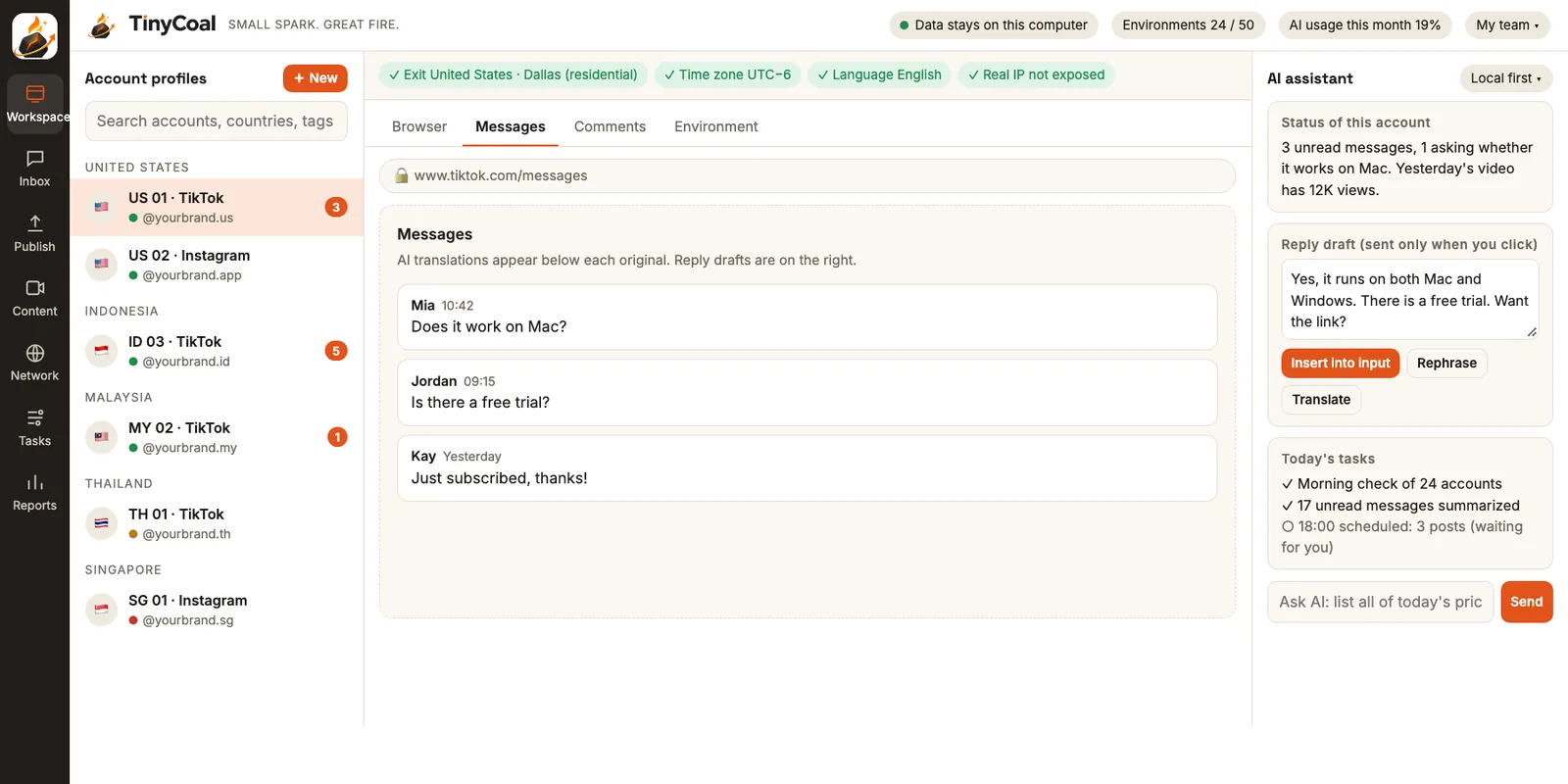
One voice per client, and AI keeps them apart
The hard part of agency replies is sounding like that particular brand. The skincare brand can't promise results, the bubble tea chain needs to mention store opening hours, and outdoor gear customers keep asking about sizes. In the Inbox, sorting rules and standard answers can be set per product and per account. When AI drafts, it looks at only three things: this message and the earlier conversation, the notes for the client this account belongs to, and the reply rules you wrote for that client. If the notes don't cover something, the draft says "Let me check that for you."
Complaints, refunds and disputes aren't drafted. They go straight to a person, because these replies often need the client's input first. For tone differences across languages, see How to reply to messages in several languages.
Video works the same way. In AI video production, asset libraries are kept per client, each separate from the others. Across one client's accounts, the system checks for duplicates so several accounts don't post near-identical videos. The reason is explained in Why AI videos all look the same.
The accounts belong to the client; you hold authorization
When you run accounts for clients, the first thing to settle is ownership. TinyCoal's Terms of service state that accounts must be legally held by the user or used with authorization. The TikTok US Terms of Service also say you may not transfer an account to someone else without permission. So the safer setup is: the account is registered in the client's name, the client keeps the recovery methods, and you are authorized to run it under your contract.
- Sign-in happens on the real sign-in page. TinyCoal doesn't collect plain-text passwords. The client can sign in once themselves, or you can sign in under your authorization, and the login then stays in that environment.
- Verification codes and two-step checks stop and go to a person. The software doesn't complete verification on your behalf. Note down whom to ask for each account's codes.
- Profile, password and linked-account changes are always done by a person. The software won't touch them.
- If the client wants official role-based access, use Business Center alongside. TikTok Business Center has admin, operator and analyst roles and suits business accounts. For how the two work together, see TikTok Business Center vs. third-party tools.
When someone leaves or changes roles
The worst handover problem is "only they knew": which exit an account uses, who approves its videos. In TinyCoal, all of this stays with the environment:
- The environment is the handover sheet. Login state, network exit, language and time zone, group and notes are all stored in the environment, so whoever takes over sees them when they open it.
- Activity logs stay on your computer. Who replied to which message and posted which video, and when, is on record.
- Moving to a new computer uses encrypted export. Browser logins are tied to the computer, so copying the folder over usually doesn't work. The app offers encrypted export and import, and backups are encrypted with a separate recovery key that only your company holds. Details in Local data and privacy.
- Run a check right after taking over. Confirm that this group's logins and exits are fine before starting work.
When a client contract ends, whether the group is exported in full for your records or deleted outright follows what you agreed with the client.
Where the weekly client report comes from
Most agencies send clients a report every week. TinyCoal's daily checks and reports record each account's status every day, along with views, engagement and inquiries for every post. You can view them per client group, then ask the AI assistant on the right of the workspace to turn last week's numbers into a table.
| Report section | Where the data comes from | Who writes it |
|---|---|---|
| What went out this week | Posted records and verification results in the publishing schedule | The software |
| Content performance | Views and engagement per video and per account | The software compiles; you pick the highlights |
| Messages and inquiries | Message type counts and reply status from the Inbox | The software compiles; you write the takeaways |
| Account status | Login, exit and verification status from the checks | The software |
| Next week's plan and recommendations | Your reading of the data | You |
A typical week
- Monday morning: Go through last week's report one client group at a time, write the takeaways and next week's plan for each report, and send them to clients.
- Monday afternoon: Add new wording and new product information from client feedback to each client's notes and asset library.
- Tuesday to Wednesday: Make videos per client and send them to the person each client named for approval. Schedule approved videos in each client's publishing plan, with times set for the account's country.
- Every day: Check the morning report. Customer service staff clear Inbox drafts client by client; for complaints, ask the client before replying.
- Friday: Check that every group's notes are current, so if someone is off next week, nobody has to explain the handover out loud again.
When to hold off
If your clients only have TikTok business accounts and are willing to add you to their Business Center, the official tool already covers role-based access and central posting. If clients want you on several platforms, need multilingual videos, or require that account data stay out of third-party clouds, TinyCoal is the better fit. For general team roles, see How a team manages multiple TikTok accounts, and for time zones with clients in several countries, see Matching language and time zone across countries. If some clients are sellers, pass them how cross-border sellers use it; for software clients, see software and brand teams.
FAQ
Can clients sign in to TinyCoal themselves to see their data?
TinyCoal is desktop software, and account data lives only on your computers. We suggest sharing what clients need to see through the weekly report. Our servers don't store account data; see our Privacy policy.
A client's account was restricted by the platform. Can TinyCoal fix that?
No. We don't help restricted accounts get around a ban, and we don't build features for opening lots of new accounts. The daily check tells you right away which account was asked to verify or was restricted. Follow the platform's appeal process and talk to your client.
Can several colleagues use it at the same time?
Yes, with a split of work, but each account environment can only be open once at a time. Common splits are by client, or one person on content and one on messages. More questions in the FAQ; for other team types, see Who it's for.
TinyCoal is coming soon. To be in the first group of users, apply for early access, or browse All features first.