


In short: account data stays on your computer, encrypted with a key protected by your operating system's key store. Only four kinds of traffic leave it: license checks, subscription status, AI requests (masked by default) and update checks. Our servers do not store passwords, cookies, browser data or original messages.
What stays on your computer
| Data | Where it's stored | How it's protected |
|---|---|---|
| Each account's login session (cookies, local storage, cache) | Your computer, one folder per environment | Encrypted; environments never share data |
| Network exit addresses and passwords | Your computer | Encrypted |
| Original messages and comments | Your computer | Encrypted |
| Asset libraries and generated videos | Your computer | Kept in the data folder you choose |
| Activity logs and reports | Your computer | Viewable only on this computer |
The app never collects your plain-text passwords. You sign in yourself on the platform's real sign-in page, and TinyCoal only keeps the login session a browser would normally save, inside that account's separate environment.
Who holds the encryption key
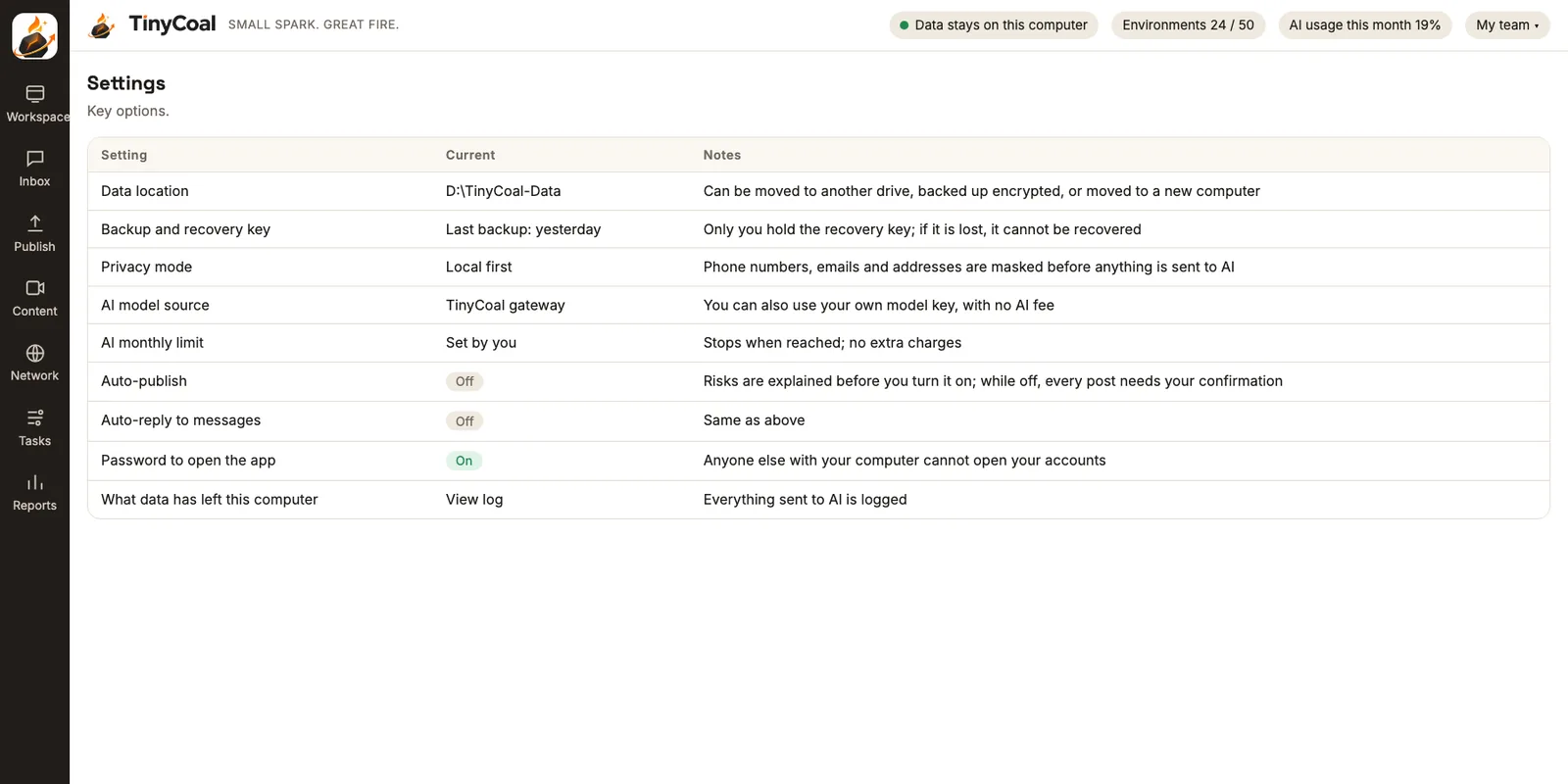
Each user has a data key protected by the operating system's built-in key store: DPAPI on Windows, Keychain on Mac. If someone copies your data folder, they can't open it without the key on this computer. You can also set a password to open the app, so someone with your computer still can't see your accounts.
What leaves your computer
| What leaves | Where it goes | Why |
|---|---|---|
| License checks and subscription status | TinyCoal servers | To confirm your license is valid |
| Update checks for the app and platform adapters | TinyCoal servers | To fix things quickly when a platform changes its pages |
| AI requests (translation, drafts, scripts) | AI model services, through the TinyCoal gateway or your own model key | To complete the AI tasks you ask for |
| Your normal activity in an account | The social platform, through that account's network exit | The same as opening the website yourself |
Every AI request is recorded locally in "What data has left this computer", where you can see what was sent and when. This record is in Reports.
Three AI privacy modes
| Mode | How it works | Best for |
|---|---|---|
| Local first (default) | Phone numbers, emails, addresses, order numbers and similar details are masked on your computer before anything goes to the model | Most teams |
| Cloud AI | With your explicit permission, original text goes to the model for better results | Teams that need top translation and drafting quality, with non-sensitive content |
| Fully local | Uses a model on your computer and sends no AI requests at all | Zero tolerance for data leaving, on a computer powerful enough |
You can use the TinyCoal gateway (AI fees based on usage) or enter your own model key. You can set a monthly AI usage limit; when it's reached, AI stops, with no extra charges. AI only drafts and suggests, and anything that goes out waits for your confirmation by default; see the Inbox and the Content studio.
Backups and changing computers
Browser logins are tied to the computer, so copying the folder to another machine usually doesn't work. TinyCoal uses its own export and import:
- Export an encrypted backup. The backup is encrypted with a separate recovery key.
- Keep the recovery key safe. Only you hold it; it's never uploaded to our servers. If it's lost, we can't recover it, and the app reminds you of this more than once.
- Import on the new computer. Enter the recovery key, and all environments, assets and records come back as they were.
The data folder can live on any drive, and you can move it at any time.
What our servers store
TinyCoal servers handle only four things: users and subscriptions, license issuing, the AI gateway and billing, and software updates. They store no account credentials, browser data or original messages. How we store what you enter in the website forms (email, team size, main platforms) is covered in the privacy policy.
The cost of local data
Knowing the costs helps you decide:
- Scheduled tasks need the computer on and the app running; see Publishing schedule.
- If you lose the recovery key, the backup can't be opened.
- In a team, account data stays with the computer, so handovers use encrypted export; see how agencies use it and how a team manages many accounts.
For dozens or hundreds of accounts, we think the control you get is worth these costs. Tell us your concerns on the contact page, or join early access first.
Everyday data habits
Software can only cover its own side; team habits matter just as much. Hand over accounts with encrypted export, and don't send login details through chat apps; see how a team manages many accounts. During the daily check, glance at the record of what data has left the computer; the list is in the daily checklist. Messages sent to AI for translation are masked by default; reply methods are in multilingual message replies. When you make videos with AI, follow the labeling rules and originality requirements. Network exits and language settings for accounts in several countries are covered in this guide. If all your accounts are in TikTok's official Business Center, compare where each option keeps your data. For different teams, see cross-border sellers, software and brand teams and Who it's for. The full feature set is in the features overview, usage rules in the terms of service, our principles on About TinyCoal, and more articles in the guides.
FAQ
Can TinyCoal staff see my accounts?
No. Account data isn't on our servers, and we have neither your data key nor your recovery key.
Is content sent to AI used for training?
The default mode masks content before sending it. How each AI model service handles data is governed by its own terms. If you don't want anything to leave at all, use fully local mode. Details in the privacy policy.
What if my computer breaks?
As long as you have an encrypted backup and the recovery key, you can restore everything on a new computer. We recommend backing up regularly. More answers in the FAQ.