


The short answer: if you sell in two or more countries, run a few TikTok accounts in each, and don't have someone dedicated to every country, TinyCoal does four things for you. It keeps each country's accounts separate and organized, makes videos in the local language at volume, gathers price questions scattered across accounts and drafts replies, and schedules posts on local time. Everything that goes out waits for you to confirm.
Here is a common setup to make it concrete: a team selling phone accessories, with 4 accounts in Indonesia, 3 in Malaysia and 3 in Thailand, 10 in total. Three people cover content, customer service and new listings. Your countries and numbers will differ, but the approach is the same.
Step one: separate accounts by country
The most common mess for multi-country sellers is every account crammed into one browser: the Indonesian account opens in the wrong interface language, and the Thai account's posting times follow the team's home time zone. TinyCoal gives each account its own separate environment: login data stored on its own, one fixed network exit, and a language and time zone that follow the exit location by default.
| Country | Environment language | Time zone | Languages customers use | What to watch in drafted replies |
|---|---|---|---|---|
| Indonesia | Bahasa Indonesia | UTC+7 (Jakarta) | Indonesian, mixed with English | Customers are usually addressed as kak; keep the tone friendly |
| Malaysia | Bahasa Melayu or English | UTC+8 (Kuala Lumpur) | Malay, English and Chinese, often mixed | Answer in whatever language the customer used |
| Thailand | ภาษาไทย | UTC+7 (Bangkok) | Thai | The polite particle at the end of a sentence depends on the agent's gender and can't be left out |
We suggest grouping by country first, then by store or product category. What kind of exit, time zone and interface language each account should have, and why they need to match, is covered in more detail in Matching language and time zone across countries.
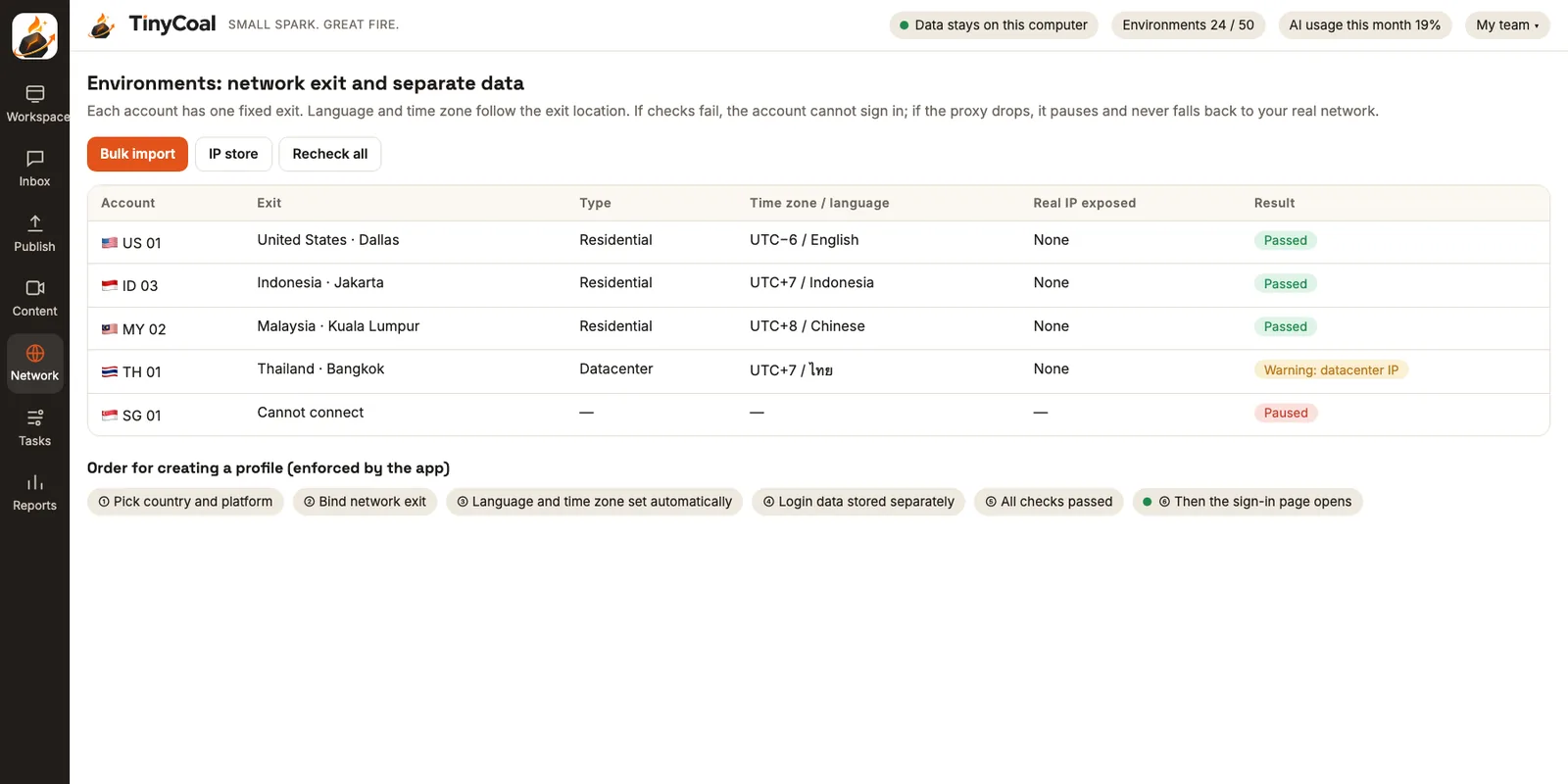
Local-language videos: one product, three country versions
For the same magnetic power bank, the Indonesian account might pitch "a whole day out without hunting for a socket", while Thai buyers may care more about the look and the colors. AI video production writes scripts from the asset library you provide (product footage, selling points, common questions, use cases). You pick one, then generate voice-over and subtitles in Indonesian, Malay and Thai.
One point needs extra attention. TikTok's Community Guidelines state that unoriginal content, or content that reuses material, is not eligible for the For You feed. Ten accounts posting the same video with only the subtitles changed will likely get no reach on any of them. So TinyCoal varies the opening, pacing, cover and caption when the same material goes to different accounts, checks for duplicates automatically, and sends anything too similar back for a redo. The reasons and the method are in Why AI videos all look the same. If a video has realistic AI footage, platform rules require a label; see Do you need to label AI-generated content?.
Answer inquiries fast: don't let an order sit in account number 7
Most seller messages ask about price, color or delivery time. With many accounts, the worst case is an inquiry sitting unseen in one account for two days. The Inbox gathers messages from all 10 accounts, plus comments under recent videos, in one place, with a translation in your team's language under each original. AI labels each message as an inquiry, support, complaint or chat, puts inquiries first, and drafts a reply in the customer's language.
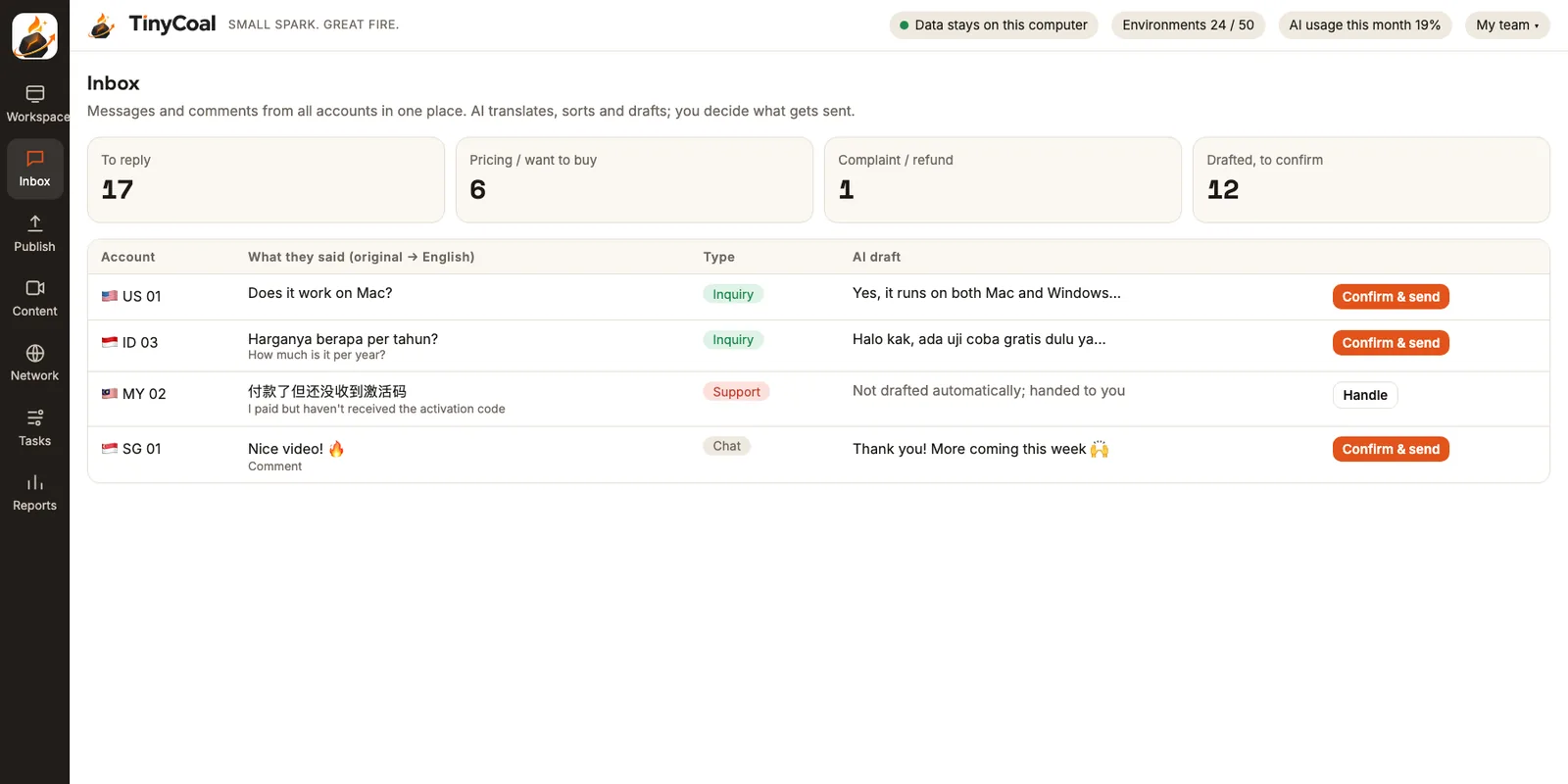
Drafts are written only from the product notes you provide: prices, free shipping threshold, shipping warehouse, return rules. If something isn't in your notes, the draft says "Let me check that for you" instead of making it up. Support issues and complaints aren't drafted; they go straight to a person. For the forms of address and tone that trip up multilingual customer service most often, see How to reply to messages in several languages.
Platforms have rules for business messages too. In TikTok's official Business Messaging API, for example, businesses can't start a conversation, and after the customer's first message they can send at most 10 replies within 48 hours. TinyCoal likewise only replies to conversations the customer started, and has no feature for messaging strangers in bulk.
Post on local time: one schedule, three time zones
8 p.m. in Kuala Lumpur is 7 p.m. in Jakarta and Bangkok, and Indonesia itself spans three time zones. In the publishing schedule, one post can go to several accounts, each with a title and hashtags in the local language, and the posting time is calculated in that account's time zone. You just write "7 p.m. local" and skip the math.
Before the time comes, the app asks you to confirm. After posting, it checks that the post really went out; if the result is unclear, it checks first and never posts twice. Failure reasons such as an expired login, a dropped exit or a platform rejection are spelled out.
Start each morning with the report
When three people run ten accounts, the biggest time saver is opening the daily checks and reports first thing. Accounts that need to sign in again, exits that dropped, and accounts asked to verify are listed at the top. After that come yesterday's views and engagement for each video, and how many inquiries each one brought in. Whenever a verification code or two-step verification comes up, the app stops and hands it to a person. For what a daily check should cover, use the daily multi-account checklist.
A typical week
- Monday: Review last week's report, pick the two or three videos that brought the most inquiries in each country, and add their selling points to the asset library.
- Tuesday: Have AI write a few script versions for each of the three countries from the library. Choose and edit them, then generate local-language voice-over and subtitles.
- Wednesday: Review the videos and send back any that fail the duplicate check. Schedule the approved ones for this week, with times entered as local time slots.
- Every day: Check the morning report, and clear the inquiry drafts in the Inbox once in the morning and once in the afternoon, sending them after you confirm.
- Friday: Add new customer questions from this week (say, compatibility for a particular model) to your product notes so next week's drafts use them.
- Weekend: Confirm posts when they're due. The rest of the time you don't need to sit at the computer.
First, check whether the official tools are enough
If all your accounts are business accounts, you only run TikTok, and your main needs are central posting and message replies, TikTok's free Business Center may be enough. It manages posting, scheduling and messages across accounts, with admin, operator and analyst roles. For how to choose, see TikTok Business Center vs. third-party tools. Consider TinyCoal when you need multilingual videos, want account data on your own computer, or plan to run Instagram and Facebook shop accounts later. For the overall approach, see How a team manages multiple TikTok accounts.
Account login data and customer messages are stored on your own computer, and phone numbers, addresses and tracking numbers are masked before anything goes to AI. Details in Local data and privacy. The accounts you run must be legally held by you; the rules are in our Terms of service. Teams that run accounts for brands can read how agencies use it, and if you have your own software or brand going overseas, see software and brand teams.
FAQ
I sell in one country with three accounts. Do I need this?
With few accounts and one language, a browser plus the official tools is usually enough. Consider it when you open a second country, or when messages pile up and get missed. For a comparison of other team types, see Who it's for.
Can it reply to inquiries automatically?
You can turn on auto-reply yourself; it's off by default. Once on, it only replies to conversations the customer started, always hands complaints, refunds and disputes to a person, and each account has a daily limit. Most sellers run "draft and confirm" for a while before deciding whether to turn it on.
Can it connect to orders in my store dashboard?
TinyCoal handles content, messages and comments on social media accounts. It doesn't process store orders. When a customer asks about order status, the draft asks you to check your store dashboard. More questions in the FAQ.
When can I start using it?
TinyCoal is coming soon for both Windows and Mac. You can apply for early access now, or browse All features first.