

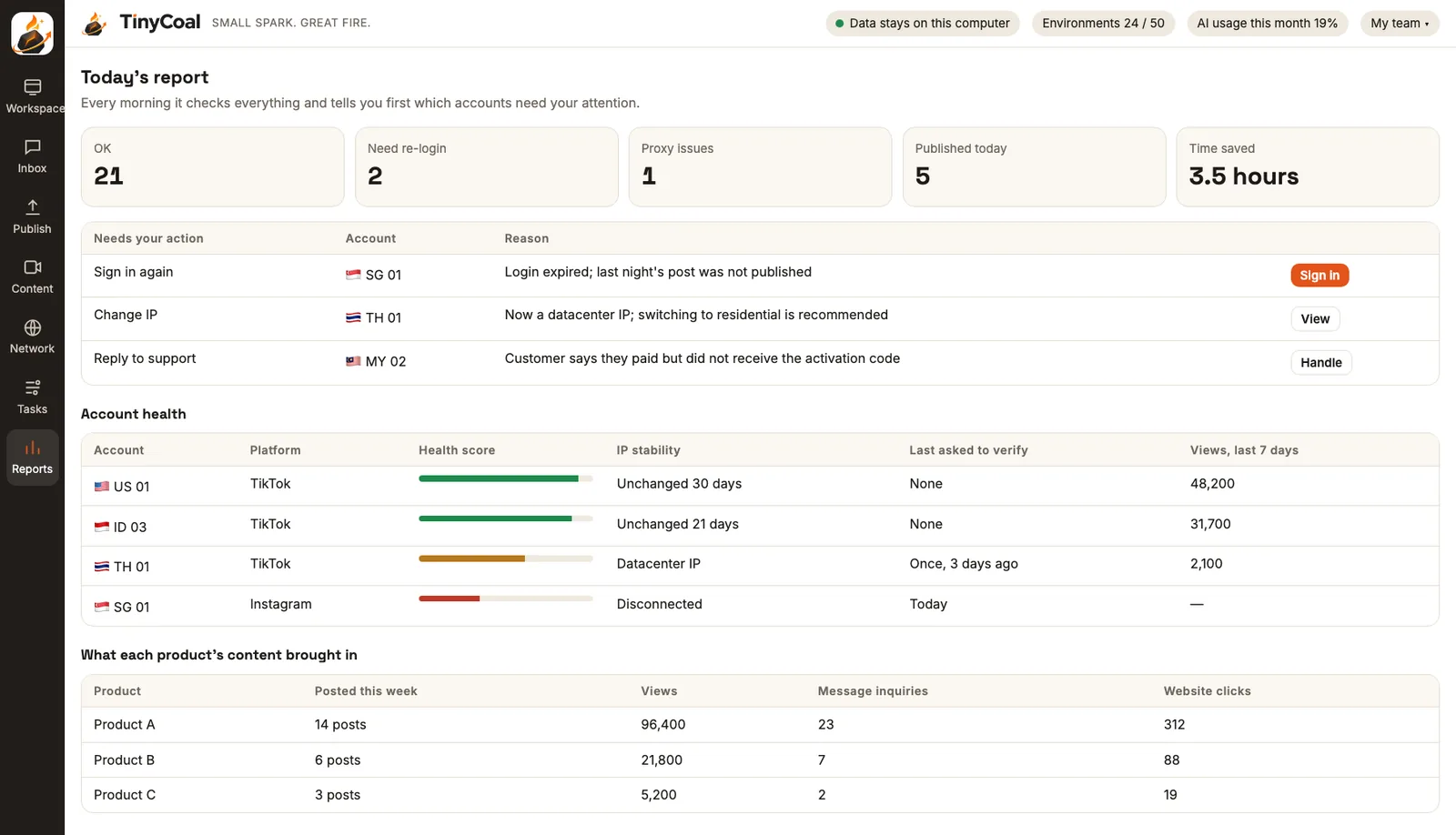
In short: the daily check is a scheduled task. At the time you set, it checks sign-in, network exit, verification requests and yesterday's posting results inside each account's environment, then writes a report. At the top is "needs your action", followed by account health and content results. The report and all records are stored on your computer.
What the check covers
| Item | How it's checked | When there's a problem |
|---|---|---|
| Sign-in status | Opens the account's home page to see if it's still signed in | Listed under "sign in again", with a button that opens the sign-in page |
| Network exit | Whether the exit connects, whether its location changed, residential or datacenter | Pauses the account if it can't connect; warns if the type is wrong |
| Verification requests | Whether the page asks for a captcha, two-step verification or identity check | Stops and hands it to you |
| Yesterday's posts | Goes back to the account page to confirm posts went live | Marks the failure reason |
| Message backlog | How many messages and comments are unanswered, and when the oldest arrived | Reminds you when it passes the limit you set |
| Page changes | Whether a platform redesign is causing read errors | Pauses automated tasks on that platform until the adapter is updated |
During the check, the app opens only a few environments at a time, closes them, then opens the next batch. It never opens hundreds of accounts at once. Environments themselves are explained in Separate account environments.
"Needs your action" comes first
The first section of the report holds only work that needs a person, sorted by urgency: expired logins that caused failed posts come first, support and complaint messages next, then suggestions such as replacing a network exit. Each row has a button that opens the right page for the right account.
Captchas, two-step verification and profile changes are never done by TinyCoal. It only makes sure you hear about them right away. That's our principle, and it's also in the terms of service.
Account health score
Each account has a health score built from a few visible measures. It isn't a black box:
- Network exit stability: how many days it's been unchanged, residential or datacenter
- Activity: how long since the last post and the last sign-in
- Any recent verification requests or restrictions
- The trend in views over the last 7 days
A low score doesn't mean something is wrong with the account. It's a prompt to take a closer look. Long-term account health comes from original content and normal use; see Why AI videos look the same and How a team manages multiple TikTok accounts.
Content results: what each product's content brought in
The second half of the report covers content results, by video, by account or by product: how many posts, views, engagement, message inquiries and clicks to your website. Inquiry counts come from sorting in the Inbox, so you can see how many pricing questions arrived after a given video.
That shows you which topics work and which countries' accounts deserve more effort. Make the next round with a clear aim in the Content studio, and adjust timing in the publishing schedule.
Activity log and data-leaving record
Reports also keeps two records: an activity log of who did what to which account and when, and a record of what has left this computer, listing every piece of content sent to an AI model. Both stay only on your computer; see Local data and privacy.
Teams that manage accounts for clients can export the report for them; see how agencies use it. If you'd like to run the check by hand first, use our daily checklist for many accounts.
Who needs daily checks most
The more countries your accounts span, the more you need the check. Cross-border sellers have accounts in different time zones, so problems often happen while you sleep. Software and brand teams promote one product on several platforms and need to see which channel brings in inquiries. Network exit problems found in the check are often tied to language and time zone setup; see Matching language and time zone across countries. For clearing a message backlog, see How to reply to messages in many languages; for whether content needs an AI label, see Do you need to label AI-generated content? Stats for TikTok business accounts are also available in the official tools; the differences are in this comparison. Report data stays on your computer, and how it's handled is in the privacy policy. More features are in the features overview, and more methods in the guides.
FAQ
Can I change when the check runs?
Yes. By default it runs once every morning. You can change the time, add more runs, or check only certain groups.
Will the report be emailed to me?
You read the report in the app. It's stored on your computer and can be exported. We don't send your account data to our servers.
Are the view counts accurate?
The numbers are read from what each platform shows on the account page, the same as what you'd see yourself. The platform's own figures are the reference. More answers in the FAQ.